Current session
5-Hour Session Allowance
Tracks remaining percentage and countdown until your current five-hour session limit refills.

Verified against the current release (v0.5.0) · Updated
Claude Usage is a free, local utility that keeps your Anthropic subscription limits and reset times continuously visible while you work. Instead of manually running /usage or opening Settings › Usage, it tracks your 5-hour session allowance and weekly limits directly in your macOS menu bar, a localhost web dashboard, or your terminal. Free, local, with a one-command install.
$curl -fsSL https://www.claudeusage.dev/install.sh | sh/install.sh before execution.Requires Python 3.9+ & Claude Code on PATH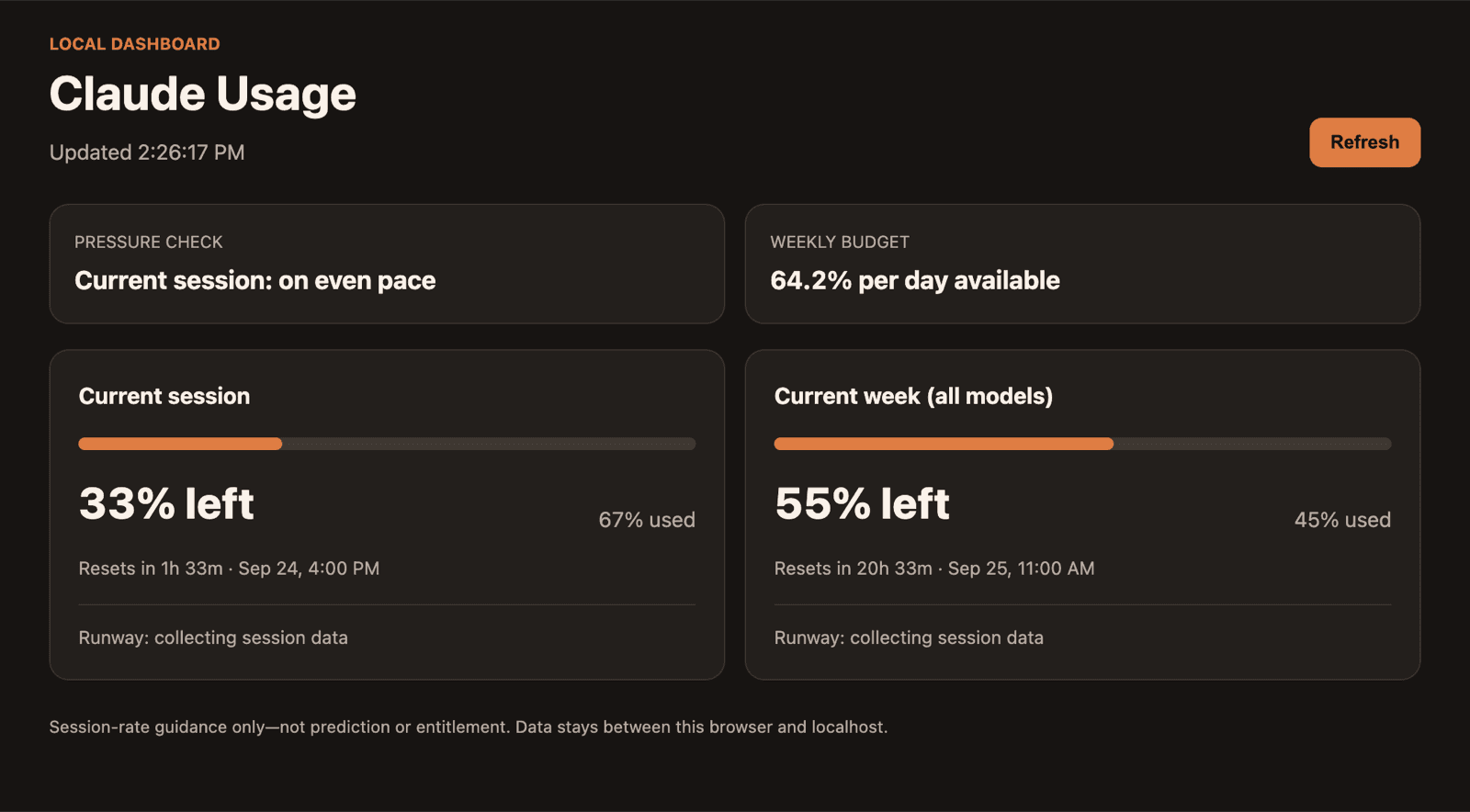
claude-usage --web, captured from a real account on September 24, 2026. It refreshes every 60 seconds.Session, weekly, and model limits
Live remaining percentages and calculated local reset times for your five-hour session, weekly usage, and any model-specific weekly windows Anthropic returns.
Menu bar, browser, or terminal
Choose ambient visibility in the macOS menu bar, an auto-refreshing localhost dashboard, or instant CLI and JSON output.
Direct connection to Anthropic
Reuses your existing local Claude Code OAuth session. Zero credentials, prompts, code, or usage metrics are ever sent to claudeusage.dev.
Burn rate budget and alert thresholds
Computes weekly budget per day and hour, monitors session pace, and offers optional menu-bar notifications at 10%, 5%, and 0% remaining.
Anthropic provides two official ways to check your subscription status: navigating to Settings › Usage in Claude web/desktop, or typing /usage in Claude Code. Both are reliable, but both require you to stop working and check on demand.
Official and accurate, but requires opening a browser, clicking your avatar, and navigating nested settings menus.
Fast terminal command during active sessions, but only visible when you remember to execute it before starting work.
Keeps your remaining percentages and reset countdowns visible in your menu bar or pinned browser tab while you work.
Claude Usage reads the active subscription limits exposed by Anthropic to your authenticated Claude Code installation:
Tracks remaining percentage and countdown until your current five-hour session limit refills.
Monitors cumulative weekly quota across all models with your account's exact scheduled reset day and time.
Displays model-specific weekly windows returned by Anthropic, including Sonnet or Opus windows when present, alongside any dynamic model-scoped limits.
Converts Anthropic's UTC reset timestamps into clear countdowns ('in 2h 14m') and local clock times ('7:30 PM PDT').
Computes the allowable burn rate in percent per day and percent per hour to distribute your remaining quota evenly until reset.
Measures hourly consumption during active work, checks if quota survives until reset, and flags whether you are ahead or behind pace.
Choose the surface that best fits your daily development workflow:
Runs as a lightweight menu-bar utility displaying your current 5-hour and weekly allowance percentages directly in the macOS menu bar. Click to open a dropdown summary with all model windows, reset times, pace estimates, and budget targets.
Start a self-contained local web dashboard with claude-usage --web. It binds strictly to loopback (127.0.0.1), automatically refreshes every 60 seconds, and provides clean visual progress bars and countdown timers for each usage window. Perfect to keep open in a pinned browser tab.
Run claude-usage in any terminal for immediate, human-readable quota percentages and local reset times. For automated statuslines (tmux, Starship, zsh) or custom scripts, claude-usage --json returns normalized schema-v1 JSON.
The CLI provides five straightforward invocation modes:
claude-usageShow current remaining quota and local reset times for all active windows.claude-usage --webStart the private localhost browser dashboard with 60-second auto-refresh.claude-usage --jsonEmit normalized schema-v1 JSON for prompt statuslines (tmux, Starship) and scripts.claude-usage --diagnostics-jsonGenerate an allowlisted system and quota snapshot strictly excluding credentials.claude-usage --versionPrint the installed version string (claude-usage 0.5.0).Claude Usage is engineered to run completely on your machine:
There is no claudeusage.dev user account, database, or backend server. The domain hosts only documentation and static release files.
Usage queries connect directly from your machine to Anthropic's OAuth usage endpoint. claudeusage.dev never sees or receives your credentials, prompts, code, or usage percentages.
The tracker reads Claude Code OAuth credentials locally from your macOS Keychain (Claude Code-credentials) or ~/.claude/.credentials.json. When file-based credentials are used, it can refresh an expired token directly with Anthropic and persist refreshed values back to that file. It never transmits credentials to claudeusage.dev, and does not write refreshed credentials to macOS Keychain (Keychain refresh requires Claude Code to refresh the login).
The web dashboard binds strictly to 127.0.0.1 and is inaccessible across networks. Terminal commands run in memory with no persistent usage-history database. The Mac app persists only local notification settings and delivered-event keys needed to avoid duplicate alerts.
Every file the tracker reads, every network request it makes, and what this website collects are listed on the privacy and local data page.
claude auth login).ANTHROPIC_API_KEY) do not have subscription session or weekly allowances; token billing for API keys is tracked in the Anthropic Console.The public beta is ad-hoc signed but has no Apple Developer ID signature or notarization. When launching the app for the first time, macOS Gatekeeper may present an unidentified developer dialog:
Claude-Usage-macOS.zip and move Claude Usage.app into your Applications folder.This approval is only required on first launch. Do not disable Gatekeeper system-wide.
Both the CLI and menu-bar app can be removed completely using the installer script:
claude-usage-install.sh --uninstallclaude-usage-install.sh --uninstall-menu-barMenu-bar uninstall unregisters the Launch at Login item before removing the application bundle from Applications. Neither command modifies Claude Code, your Anthropic credentials, or any other files.